Home / Engineering

Engineering & Technical Work

Four case studies on how I approach engineering problems. Each one follows the same structure and uses real project work. Where I don't have measurements, I describe the solution instead of quoting numbers.

Case study 01

Multiplayer Networking

1. Overview

Networking work across three projects: dedicated-server multiplayer in Ktrl Smash (Unity, Photon Fusion, AWS), a server-authoritative combat simulation in Merge Tactics (Unreal Engine 5.8), and a backend-agnostic session layer in The Cursed Hour (Unreal Engine 5, Epic Online Services and Steam).

2. Problem

  • Ktrl Smash: ping climbed during a session, from 20 to 60 ms on Windows and from 40 to 100 ms on WebGL.
  • Merge Tactics: a paid framework needs match results that players cannot tamper with.
  • The Cursed Hour: ship on Steam while planning a cross-platform rollout through Epic Online Services.

3. Technical challenges

  • WebGL runs on a single main thread, so per-frame work accumulates there.
  • Frequent network updates and redundant replicated state made the load worse.
  • Deciding where authority lives, so that clients render outcomes but never compute them.
  • Two online backends with different APIs behind one lobby and session experience.

4. My responsibilities

  • Ktrl Smash: the multiplayer layer on Photon Fusion; deploying dedicated servers on AWS together with the devops team; diagnosing and fixing the ping drift.
  • Merge Tactics: the whole architecture and implementation, as a solo project.
  • The Cursed Hour: the lobby and session layer, text and voice chat, and the EOS and Steam SDK integration.

5. Approach and debugging

  1. Measure over the whole session. The problem only showed as drift, so ping had to be watched for the length of a match, on both builds.
  2. Compare platforms. WebGL drifted further than Windows. WebGL runs on a single main thread, so per-frame work was the first suspect.
  3. Audit every instance, not one. I audited coroutine usage across the codebase, then the update rate, the payload size and each replicated variable.
  4. Re-measure on both builds after the change.
  • Make the server the only place combat is decided, and send clients a compact record of what happened.
  • Keep the session layer independent of any one backend so a second one can be added.

6. Implementation

  • Ktrl Smash: reduced update frequency and payload size, and removed replicated variables that were not needed.
  • Merge Tactics: at the end of the prep phase the server locks board snapshots, simulates combat, and replicates one compact event log. Clients replay that log for animation. The round loop (prep, combat and results phases, recency-weighted pairing, ghost boards for odd lobbies, PvE rounds, spectating and late join) runs on standard Unreal replication.
  • The Cursed Hour: EOS and the Steam SDK are integrated in parallel behind the same session layer.
Merge Tactics server-authoritative combat flow On the server, board snapshots are locked, combat is simulated, an event log is built and results are applied. Clients receive the event log once and replay it visually. SERVERCLIENTS Lock board snapshotsend of prep phase Simulate combattargeting, abilities, traits Build event logcompact, ordered events Apply resultsHP, gold, pairing Receive event logreplicated once Replay visuallyanimation, VFX, UI
Clients only receive the server's event log and replay it for animation. They never compute a match outcome.

7. Results

Ktrl Smash ping over a sessionBefore the fixAfter the fix
Windows20 to 60 msStays flat
WebGL40 to 100 msStays flat
  • Merge Tactics: clients never compute outcomes, which closes the cheat surface on match results.
  • The Cursed Hour: released on Steam in November 2024. The cross-platform rollout through EOS was planned, and the session layer was built to support it.

8. Technologies used

Photon Fusion, AWS, Unity (C#), WebGL, Unreal Engine 5 replication, C++, Epic Online Services, Steam SDK
Case study 02

Combat & Gameplay Systems

1. Overview

Combat and ability architecture from three independent projects and one studio game: the extension interfaces of Merge Tactics, the sample abilities in HitzGAS Toolkit, the boss fight in Hitz AI Suite, and the mech combat loop I owned in Fight Hero.

2. Problem

Combat code is where designers most often need to change behaviour, and where GAS projects and non-GAS projects want different things from the same framework. The goal was a core that other people could extend without editing it.

3. Technical challenges

  • Keep the framework core independent of the Gameplay Ability System while still supporting projects that use it.
  • Expose every extension point to Blueprint so that buyers can ship a game without writing C++.
  • Make abilities, damage and interruption behave predictably (for example damage that reduces a shield before health and clamps at zero).
  • Give players a fair window to react to boss attacks.

4. My responsibilities

  • Merge Tactics, HitzGAS Toolkit, Hitz AI Suite: designed and implemented all of the systems described here, solo.
  • Fight Hero (studio): the mech combat loop, enemy waves, and upgrade and progression balancing; I also directed the art team on combat animation and gameplay assets.

5. Approach and debugging

  • Put each decision behind a small interface (who to target, how a stat is read, what a trait does, how an ability executes).
  • Write a bridge for GAS projects instead of building GAS into the core.
  • Ship working sample abilities so the patterns can be read and adapted.
  • Drive boss behaviour from one behavior tree, so telegraphs, phase changes and interruptions are all conditions on the same tree.

6. Implementation

  • Merge Tactics: four Blueprint-implementable interfaces: stat provider, targeting strategy, trait effect and ability executor. A GAS bridge maps the stat interface onto an existing AttributeSet, per unit, with no changes elsewhere.
  • HitzGAS Toolkit: three components add GAS to a Blueprint actor. Sample abilities cover instant line-trace damage, area-of-effect damage, a channeled ability that gameplay events can interrupt, a root-motion dash with a cooldown, projectiles that carry an on-hit effect, and a tag-driven toggle. A live debugger shows attributes, granted abilities, active effects and owned tags.
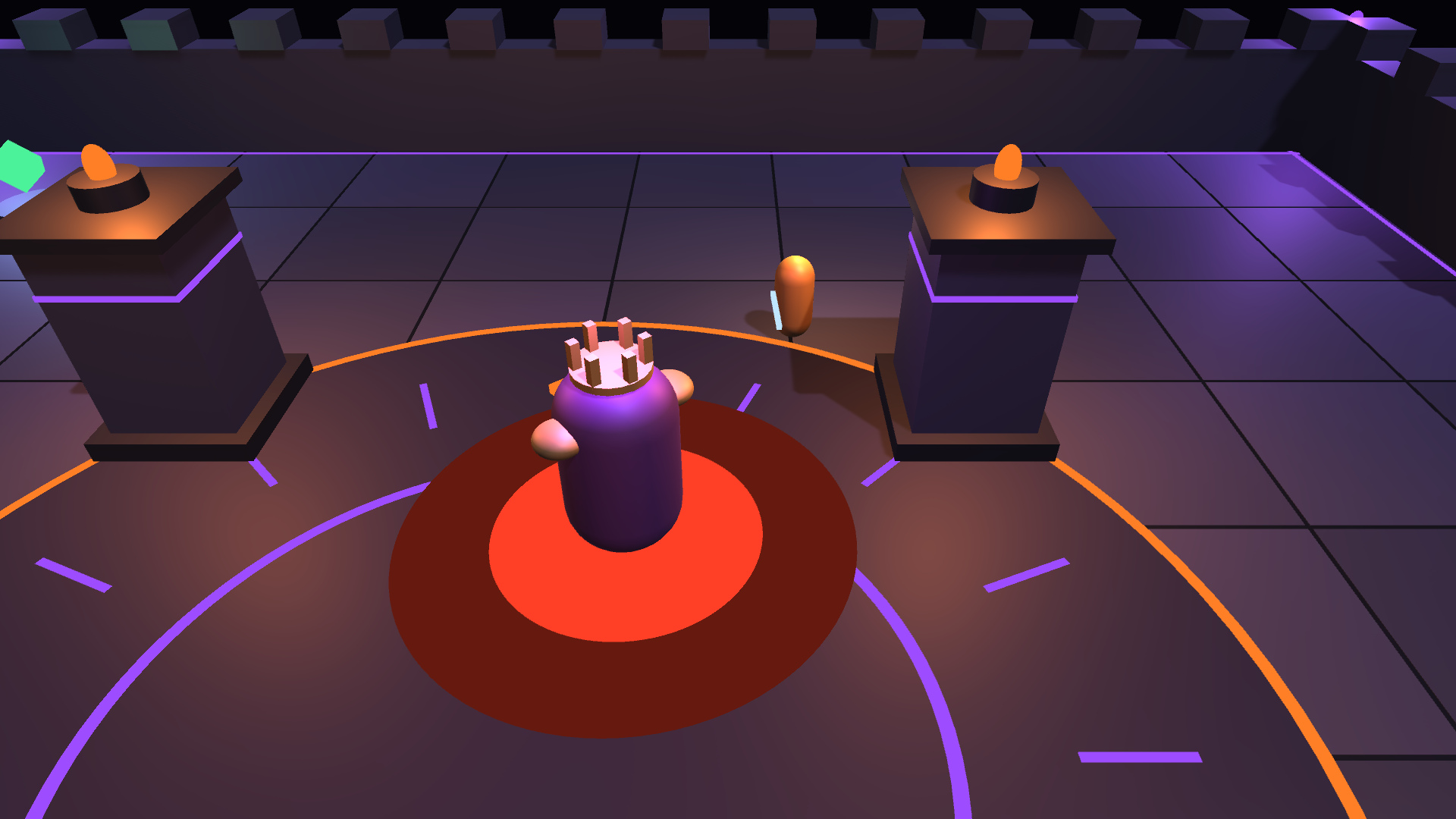
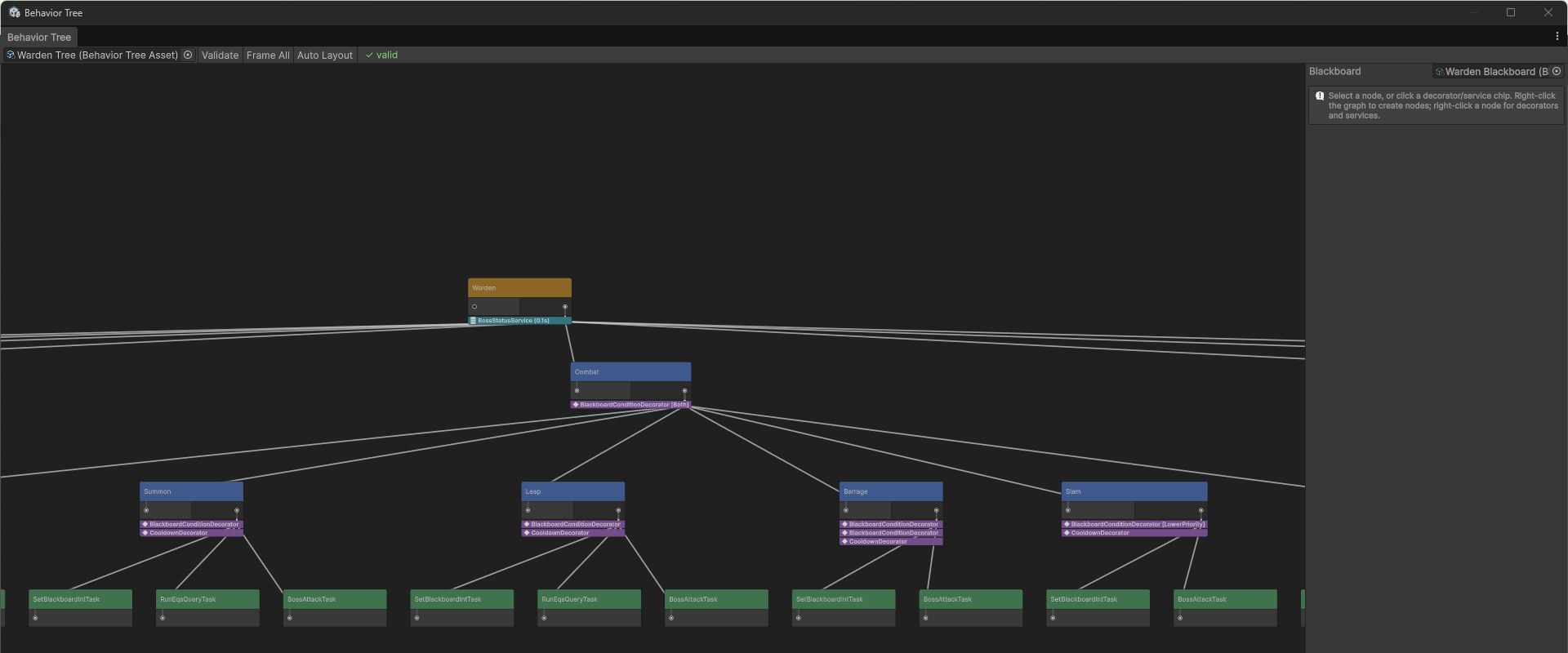
  • Hitz AI Suite boss fight: the Warden telegraphs its slam, roars when it crosses a health threshold (which writes to the blackboard and interrupts the current move), summons minions at EQS-chosen spots, and in the last phase walks to a healing shrine that hitting it interrupts.
// Source/HMT_Core/Public/Units/IHMT_TargetingStrategy.h
UINTERFACE(BlueprintType, MinimalAPI)
class UHMT_TargetingStrategy : public UInterface { GENERATED_BODY() };

class HMT_CORE_API IHMT_TargetingStrategy
{
    GENERATED_BODY()
public:
    UFUNCTION(BlueprintNativeEvent, BlueprintCallable,
              Category = "HitzMergeTactics|Combat")
    AActor* SelectTarget(AActor* SelfActor,
                         const TArray<AActor*>& Candidates,
                         UHMT_CombatContext* Context);
};
// Source/HMT_Core/Public/Stats/IHMT_StatProvider.h (excerpt)
class HMT_CORE_API IHMT_StatProvider
{
    GENERATED_BODY()
public:
    UFUNCTION(BlueprintNativeEvent, BlueprintCallable)
    float GetFinalStatValue(FGameplayTag StatTag);

    UFUNCTION(BlueprintNativeEvent, BlueprintCallable)
    void ApplyStatModifier(FGameplayTag StatTag,
        EHMT_StatModOp ModOp, float Magnitude,
        EHMT_ModifierDuration Duration, ...);
};

7. Results

  • The Merge Tactics framework drops into an existing project by copying three source folders, and a complete game can be built on it without C++.
  • The HitzGAS Toolkit works in Blueprint-only projects.
  • I have no player-facing combat metrics to quote, so I am not quoting any.

8. Technologies used

Unreal Engine 5, C++, Blueprint, Gameplay Ability System, Gameplay Tags, Unity, C#

Case study 03

AI Systems

1. Overview

Hitz AI Suite is an AI toolkit for Unity 6 that I designed and built alone. Its Boss Fight sample shows every system working in one encounter. I also built the ghost NPC for The Cursed Hour.

The Warden boss mid-slam in the Hitz AI Suite boss fight sample
The Boss Fight sample: one behavior tree picks every move; the red disc telegraphs the slam.

2. Problem

Enemies, companions and crowds need perception, decision-making, movement and world interaction that work together and stay fast with hundreds of agents. The concepts exist in Unreal Engine's AI framework; Unity projects usually assemble them from separate parts.

3. Technical challenges

  • Running every AI system on one scheduler with level of detail and a per-frame time budget.
  • Letting conditions interrupt lower-priority behaviour the moment they change.
  • Scoring candidate positions (cover, flanking, leaps, summon spots) cheaply enough to run often.
  • Making agent decisions visible while debugging.

4. My responsibilities

All of it, as an independent project: the runtime systems, the editor tooling, the samples and the documentation.

5. Approach and debugging

  • Share one blackboard between senses and decisions.
  • Let any system be left out of a project, so unused code never runs.
  • Run EQS scoring in Burst jobs.
  • Make the debugger part of the product, not an afterthought.

6. Implementation

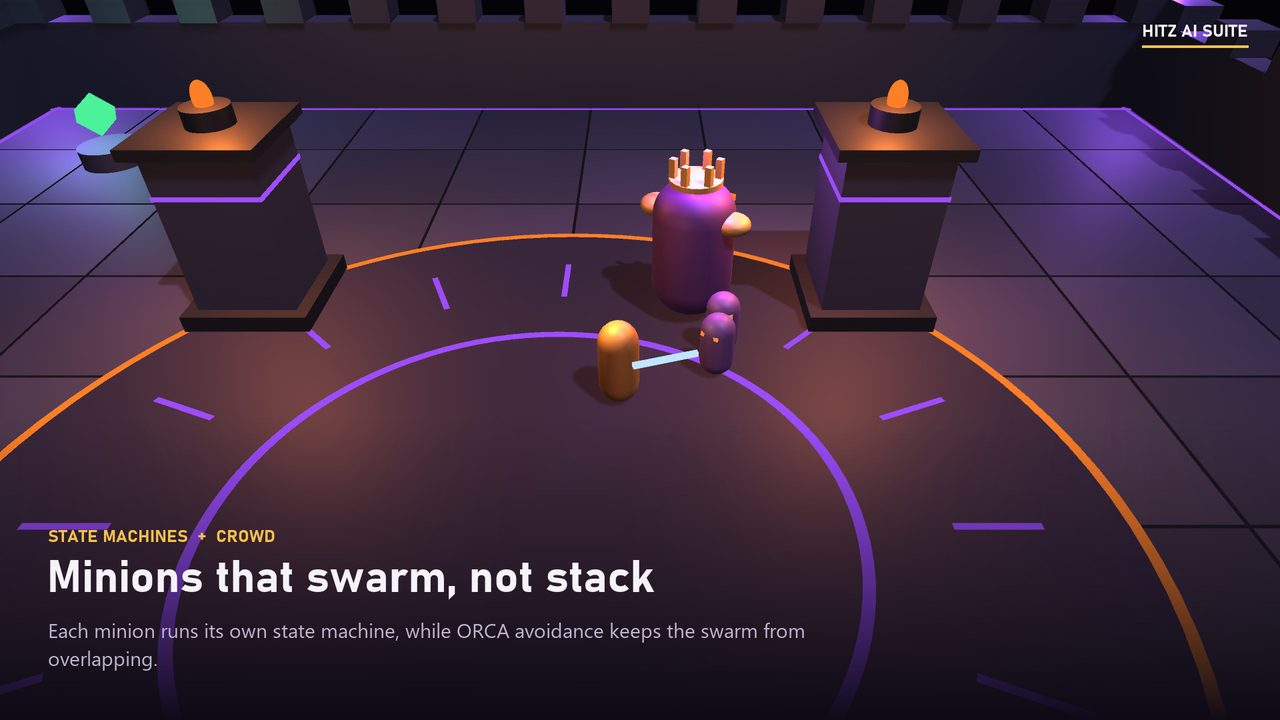
  • Behavior Trees with priority and interrupt conditions, plus a State Machine for simpler agents such as the minions.
  • Perception: sight (cone, distance, line of sight), hearing, damage, touch, team reports and prediction, with memory that fades.
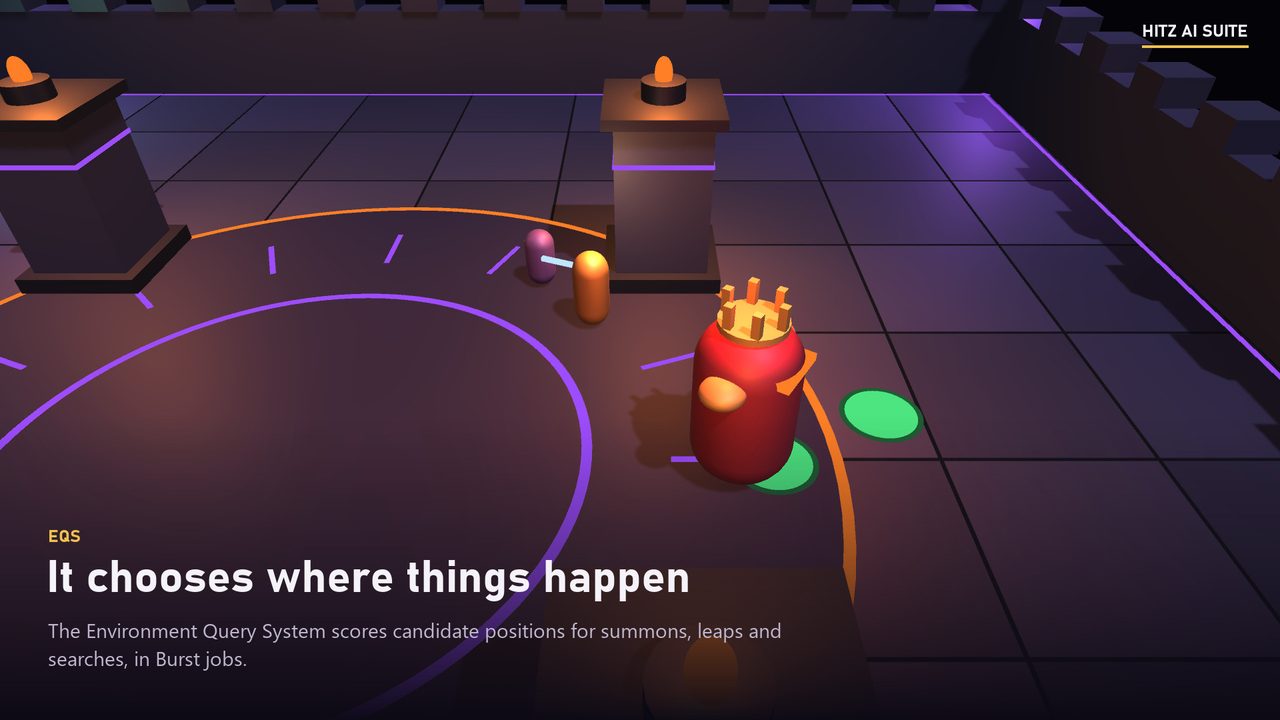
  • EQS: generate candidate points, test them (distance, visibility, reachability) and pick the best.
  • Navigation on Unity's NavMesh with budgeted path requests; Crowd avoidance (ORCA); Smart Objects that one agent claims at a time.
  • Debugging: an in-game overlay, an Agent Inspector, a Visual Logger timeline and live highlighting in a GraphView behavior tree editor with automatic layout and validation of every blackboard key. There is also a bridge to Unity's own Behavior package.
Hitz AI Suite system architecture Perception writes to the agent blackboard. A behavior tree or state machine reads the blackboard and drives EQS, navigation, crowd avoidance and smart objects. Everything runs inside one AI World with a scheduler, level of detail and a per-frame budget. AI WORLD: ONE SCHEDULER, LOD, PER-FRAME TIME BUDGET Perceptionsight, hearing, damage Blackboardper-agent memory Behavior Tree / State Machinepriorities, interrupts EQSpositions, Burst jobs NavigationNavMesh, budgeted CrowdORCA avoidance Smart Objectsclaimed activities
Senses and decisions share one blackboard. The decision layer asks EQS where to go, moves through Navigation and Crowd, and claims Smart Objects. Every system can be left out of a project.
The Hitz AI Suite behavior tree editor showing the Warden combat branch
The Warden's combat branch in the GraphView editor, with automatic layout and blackboard key validation.
EQS scoring candidate summon positions around the Warden
EQS scores candidate summon spots.
Minions swarming with crowd avoidance
Minions: State Machine plus ORCA crowd avoidance.

7. Results

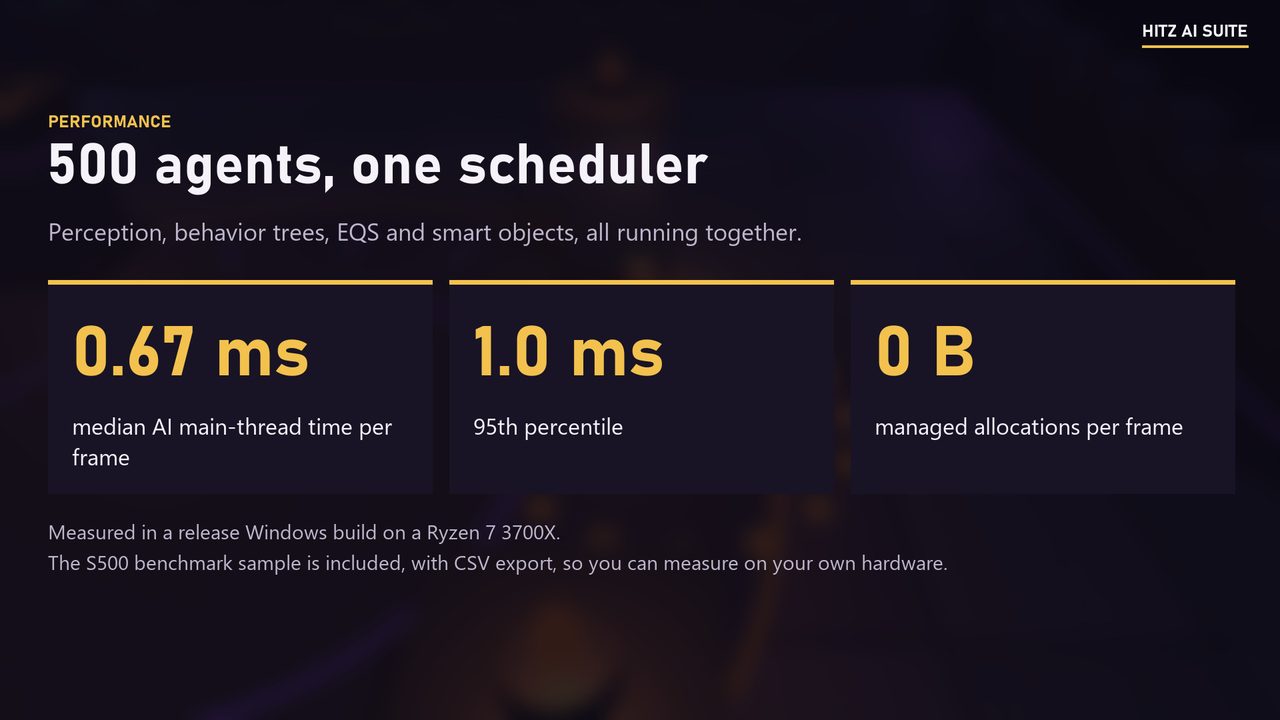
  • 500 agents with perception, behavior trees, EQS and smart objects run at 0.67 ms median and 1.0 ms p95 of AI main-thread time per frame, with no managed allocations per frame. Measured with the included benchmark in a release Windows player on a Ryzen 7 3700X.
  • The suite has EditMode, PlayMode and performance test suites.

8. Technologies used

Unity 6 (6000.3+), C#, Burst, GraphView, NavMesh

Case study 04

Performance Engineering

1. Overview

Performance and debugging work from studio and independent projects: the WebGL ping drift in Ktrl Smash, the AI frame budget in Hitz AI Suite, and an iOS crash that turned out to be a build-configuration problem.

2. Problem

  • Ping that gets worse the longer a session runs.
  • An AI framework that has to stay inside a fixed per-frame budget as agent counts grow.
  • A persistent iOS bad_weak_ptr crash with no obvious code cause.

3. Technical challenges

  • Separating network cost from main-thread cost on a single-threaded platform.
  • Avoiding managed allocations in per-frame AI code.
  • Finding the cause of a crash that appeared only in iOS builds.

4. My responsibilities

I diagnosed and fixed the Ktrl Smash ping drift and the iOS crash at Fiftyfive Gaming Studio, and I designed and measured the Hitz AI Suite benchmark myself.

5. Approach and debugging

  • Measure before changing anything, and measure over the length of a session.
  • Find the cause, then audit everything of the same kind (every coroutine, every replicated variable).
  • Put the budget into the tests: zero-allocation and time-budget tests sit next to the feature tests.
  • For the crash, follow the build, not the code.

6. Implementation

  • Ktrl Smash: audited coroutine usage across the codebase, cut update frequency and payload size, and removed unneeded replicated variables.
  • Hitz AI Suite: a shared scheduler with level of detail and a per-frame time budget; EQS scoring in Burst jobs; zero-allocation and budget tests.
  • iOS crash: the cause was Firebase being linked twice, once through Unity's prebuilt libraries and once through the Swift Package Manager resolution that EDM4U performs. Removing the duplicate fixed it.

7. Results

  • Ktrl Smash ping stays flat for the whole session on both Windows and WebGL.
  • Hitz AI Suite: 0.67 ms median, 1.0 ms p95 for 500 agents in a release Windows player (Ryzen 7 3700X), no managed allocations per frame.
  • The iOS crash stopped.
Hitz AI Suite benchmark summary for 500 agents
From the Hitz AI Suite Fab gallery: the 500-agent benchmark, release Windows player.

8. Technologies used

Unity profiling, Unreal Insights and Session Frontend, RenderDoc, GPU Visualizer, Burst, Xcode, Firebase, EDM4U