 HITZ Merge Tactics
A complete, playable auto-battler project for UE5: board & bench, merge & synergy, shop economy, server-authoritative combat, and the full multiplayer round loop — open the project and press Play. No C++ required to ship your own game with it.
Board, shop, traits, and combat — the full loop running together.
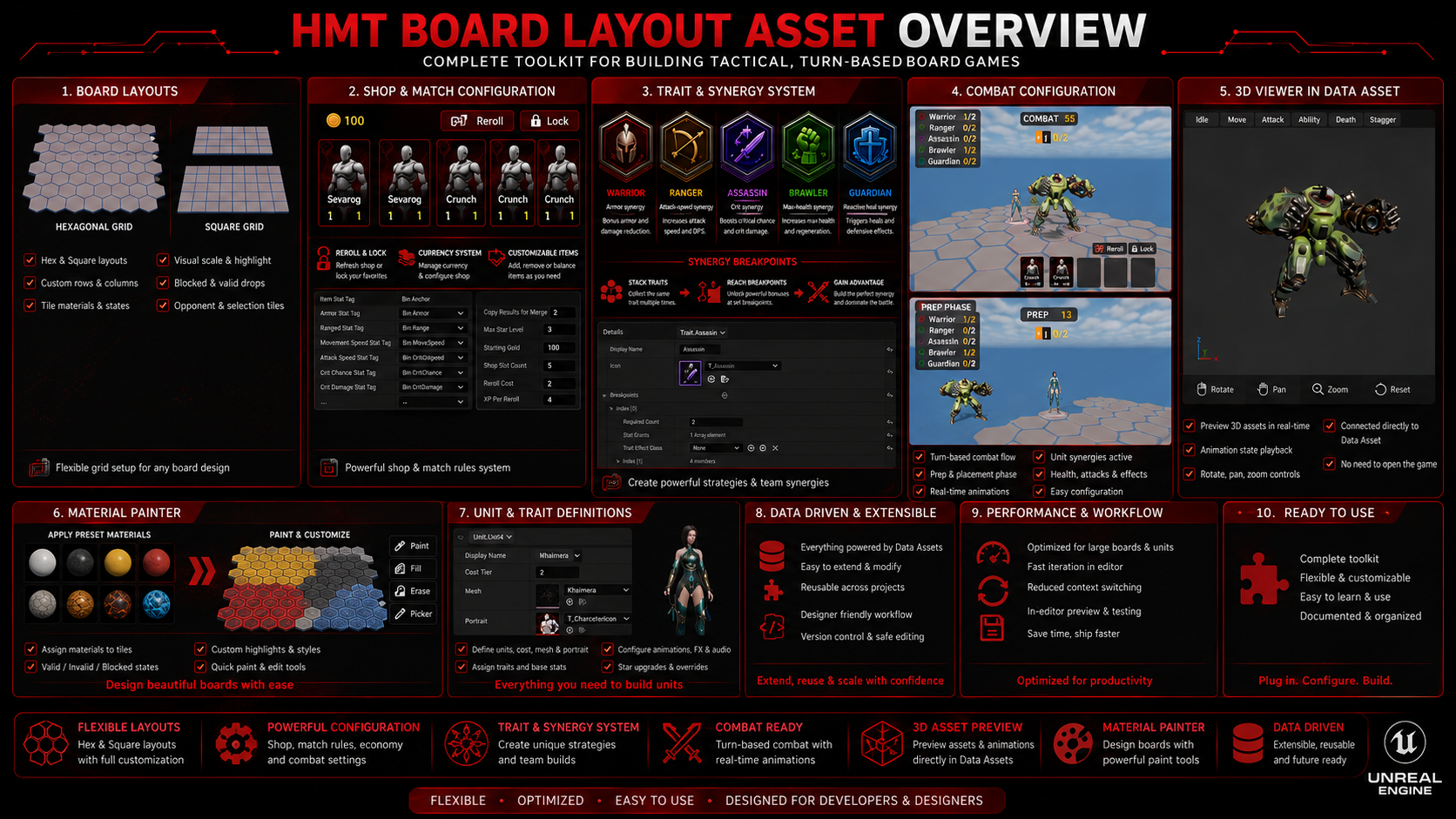
All systems are data-driven and reachable from Blueprint. C++ is there when you want it, never required.
Tag-driven stats and modifiers, replicated efficiently. Adding a new stat is pure data — define a Gameplay Tag, use it. No AttributeSet subclassing, no engine module dependencies.
IHMT_StatProvider · UHMT_StatComponentBoth topologies ship, chosen per board asset. Neighbor/distance/world-transform math is separate from board state, so layouts stay reusable across every board you author.
IHMT_GridLayout · UHMT_BoardComponentConfigurable copies-to-merge and max star level. Traits activate at count breakpoints with pure-data stat grants — plus an interface hook for traits that need real behavior.
UHMT_UnitCollectionComponent · IHMT_TraitEffectShared unit pool, gold costs, streak bonuses, interest, income — every number lives on one data asset. Reroll, lock, and bench-first purchasing built in. No player level/XP grind — tier odds are flat all match, Clash Royale Merge Tactics style rather than TFT.
UHMT_ShopComponent · UHMT_MatchRulesAssetAn optional hero/avatar per player: match HP, a Blueprint passive ability, and a physical presence standing next to their board with a floating name/HP bar that faces the camera. Spectating a bot or another player projects their Ruler too, not just their army.
AHMT_RulerActor · UHMT_RulerDefinition · IHMT_RulerPassiveMatch-wide modifiers roll at match start from a data-asset pool — grant a passive building, scale board capacity, anything a Blueprint effect class can do. Tile modifiers apply the same idea per board cell.
UHMT_GameModifierDefinition · IHMT_TileEffectCombat simulates server-side against locked board snapshots and replicates as a compact event log. Clients replay events for animation — they never compute outcomes.
UHMT_CombatResolver · UHMT_CombatPlaybackComponentPreparation → Combat → Results, looping to match end. Recency-weighted pairing, ghost boards for odd lobbies, PvE rounds, and spectating — on standard actor replication.
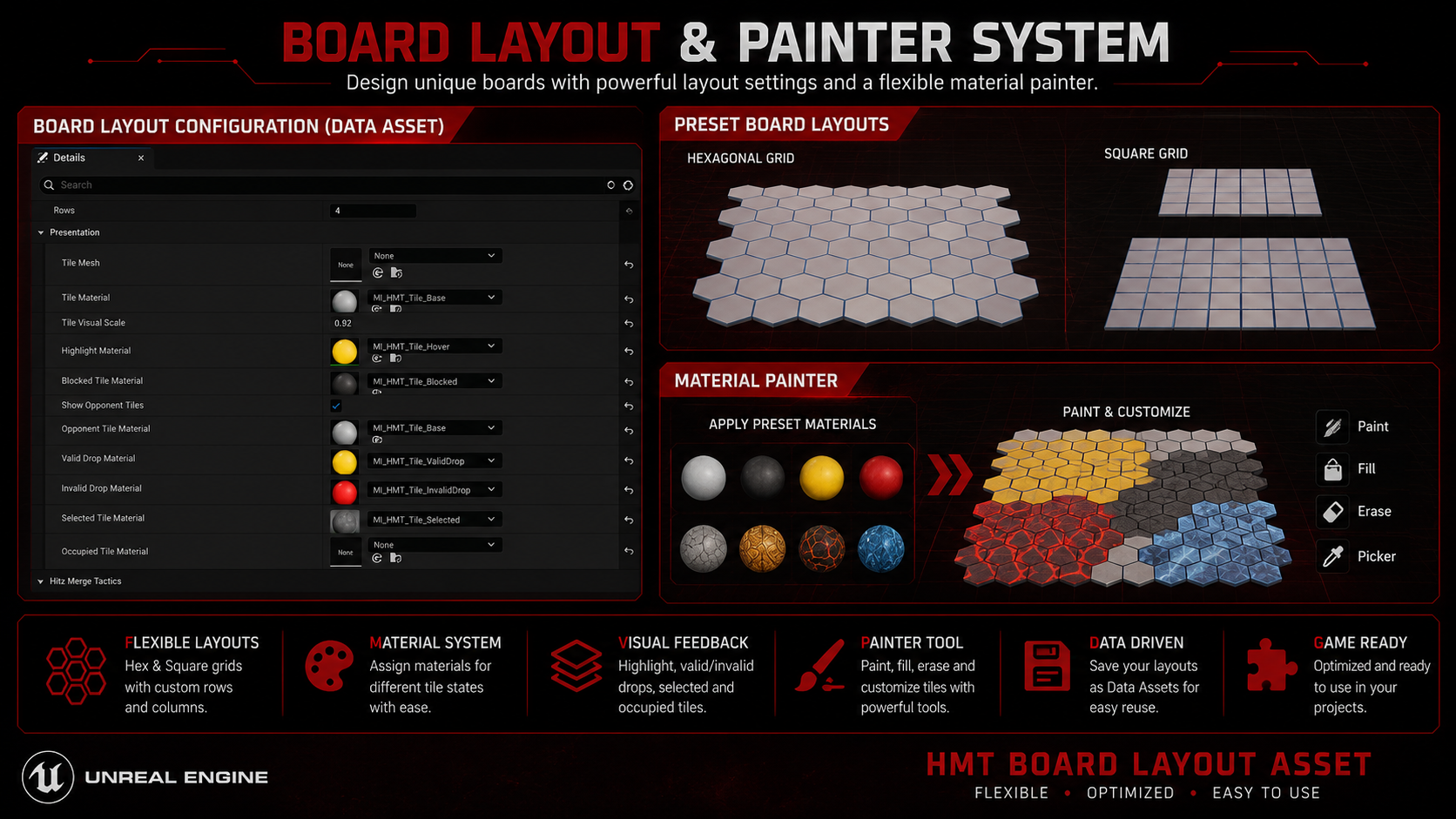
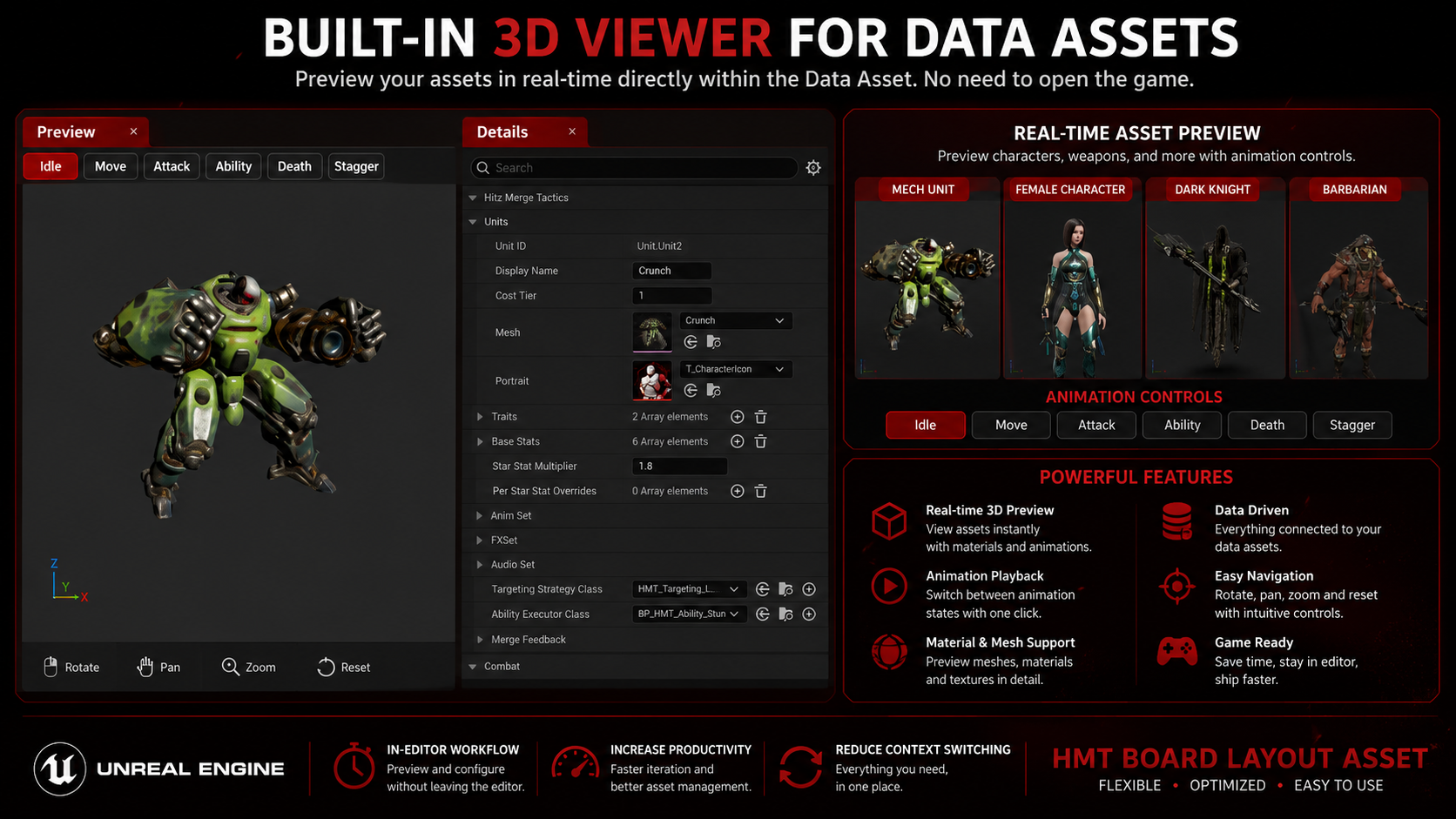
UHMT_MatchStateComponentClick-to-paint board layout editor, live 3D unit preview with per-animation playback buttons, and content validation that flags broken data on every save.
HMT_CoreEditor moduleAlready invested in GameplayAbilities? A bundled bridge module maps the same stat interface onto your existing AttributeSets — swap in UHMT_ASCStatComponent per unit and every other system keeps working unchanged, since it only ever talks to the interface.
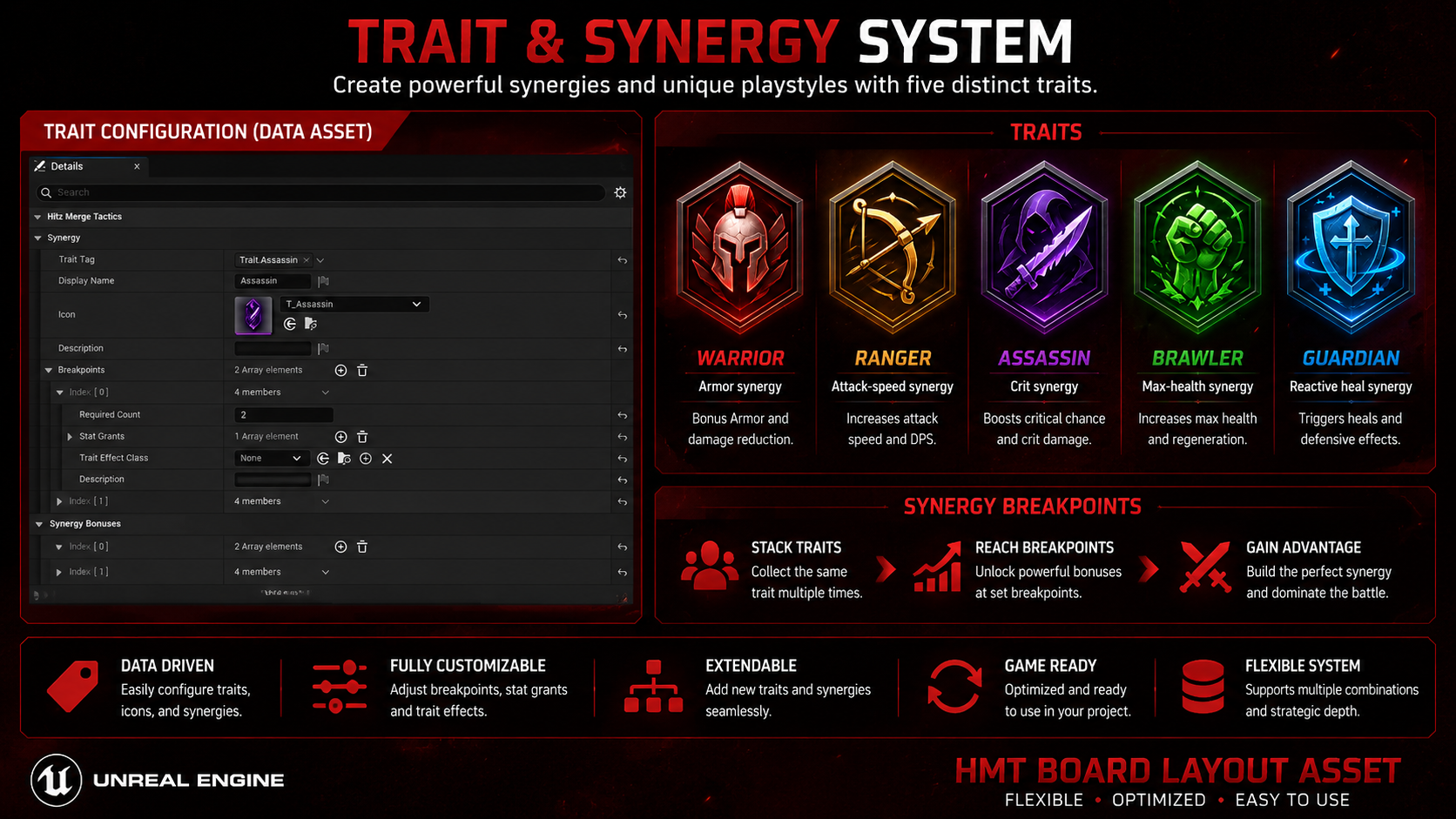
Shipped as working example content with exclusive-tier breakpoints — study them, reskin them, or replace them entirely. New traits are data assets, not code.
Armor synergy

Attack-speed synergy
Crit synergy

Max-health synergy

Reactive heal (behavior trait)
Captures from the included reference project. Click any image to browse them full-size.
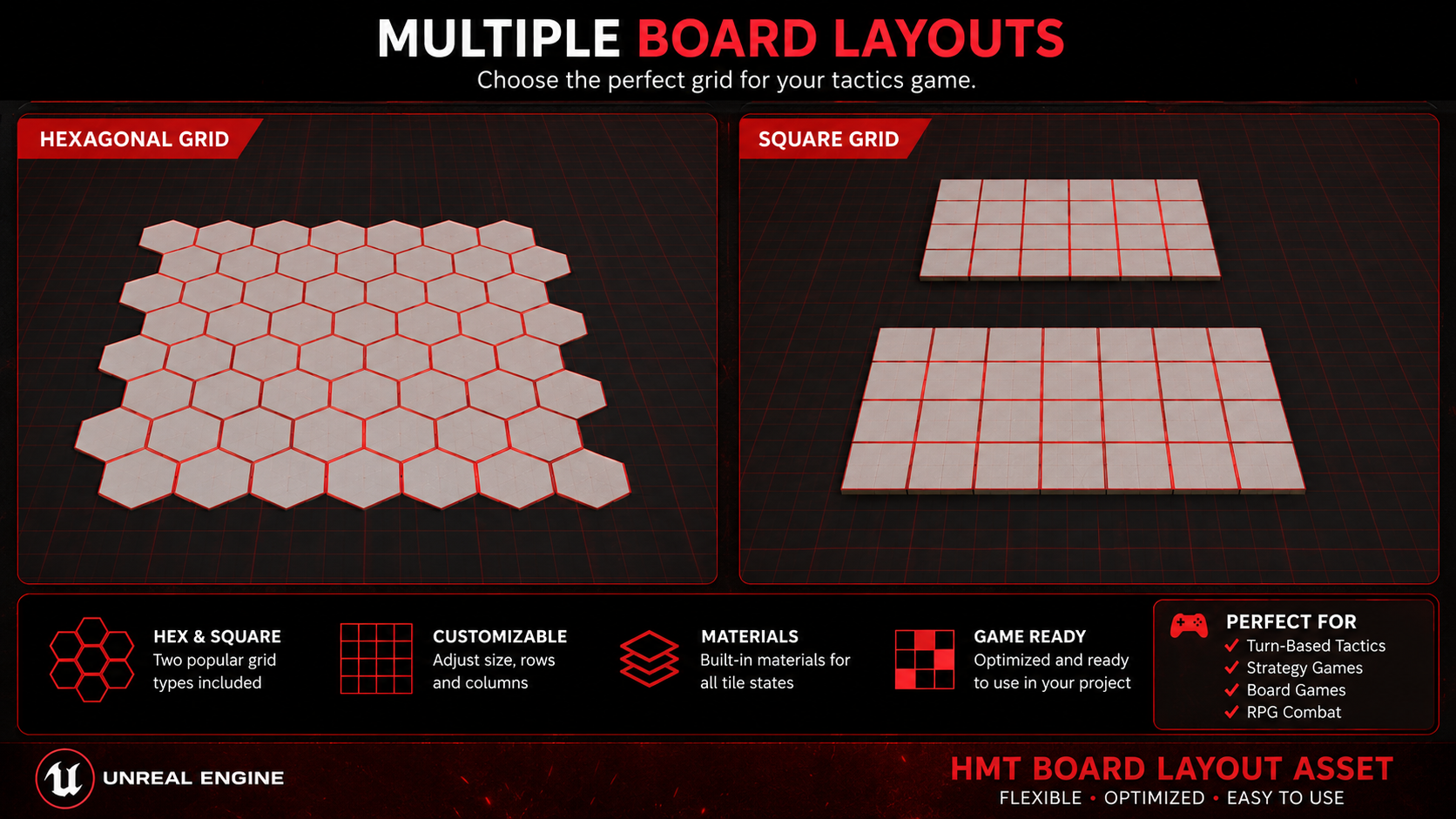
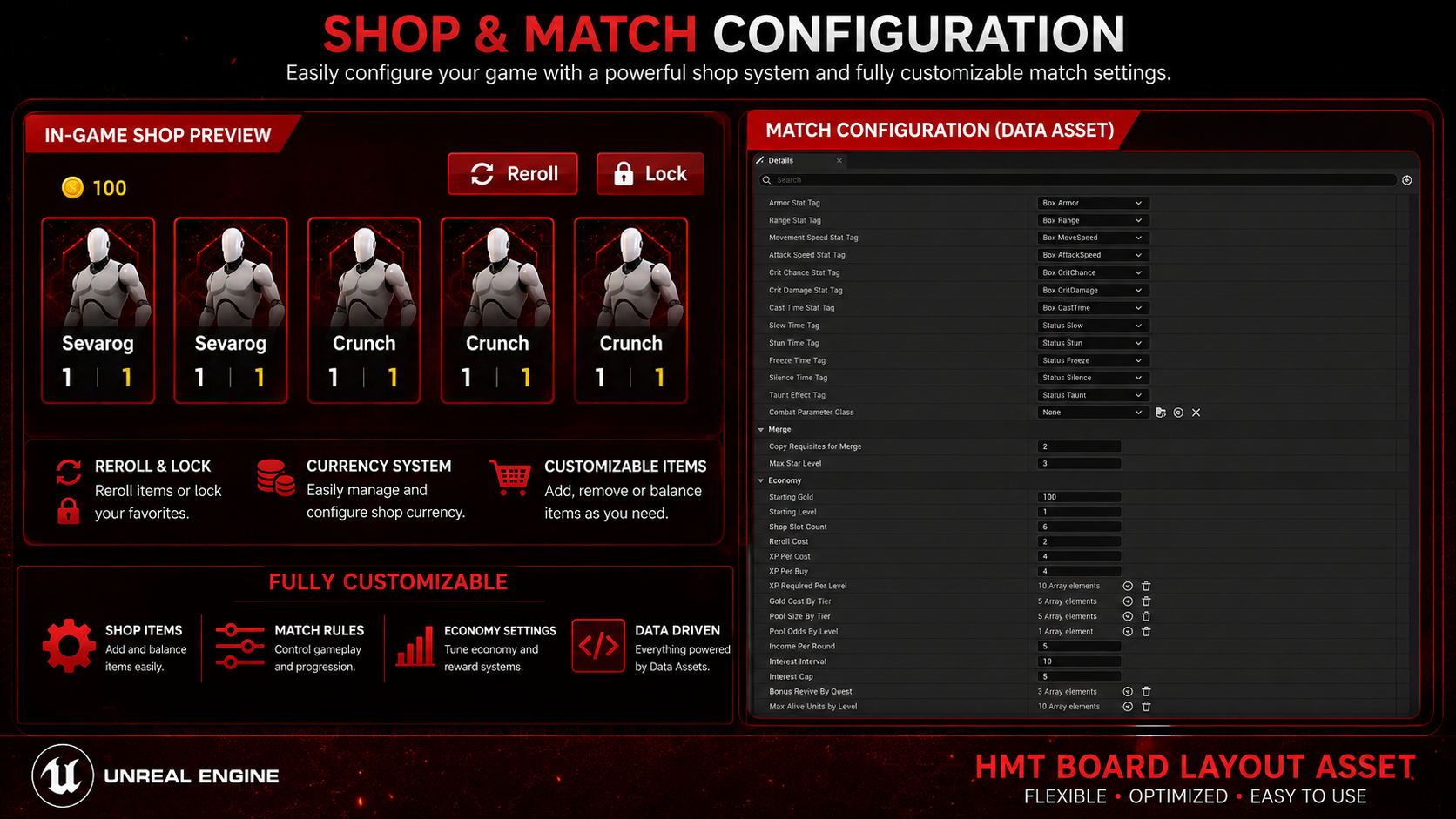
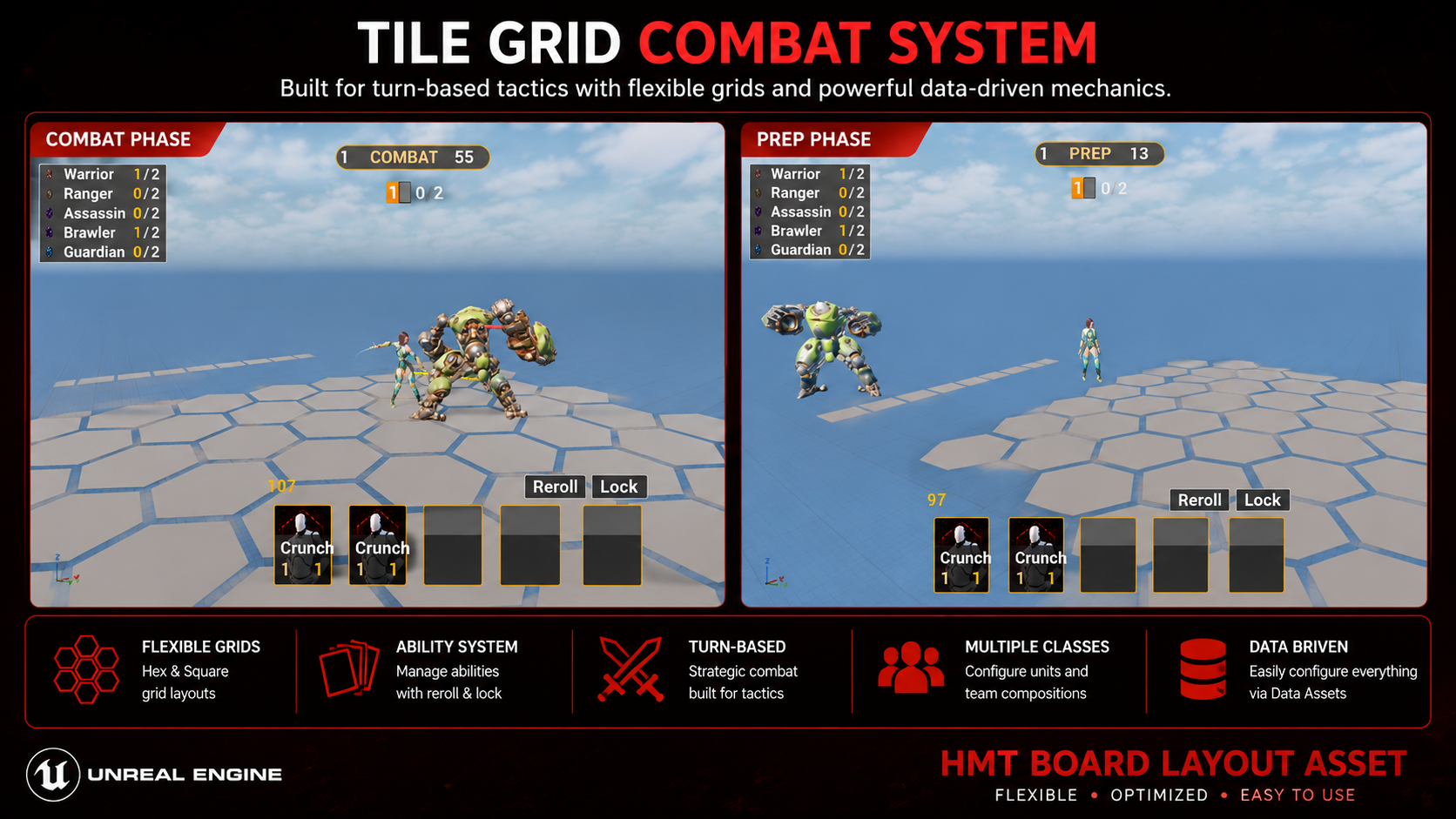
Everything from install to a playable match — no C++ needed at any step.
GameplayAbilities and every other engine dependency the project needs are already declared in its .uproject and enable themselves.Ships as a complete, ready-to-open Unreal project — not a plugin you drop into something else.
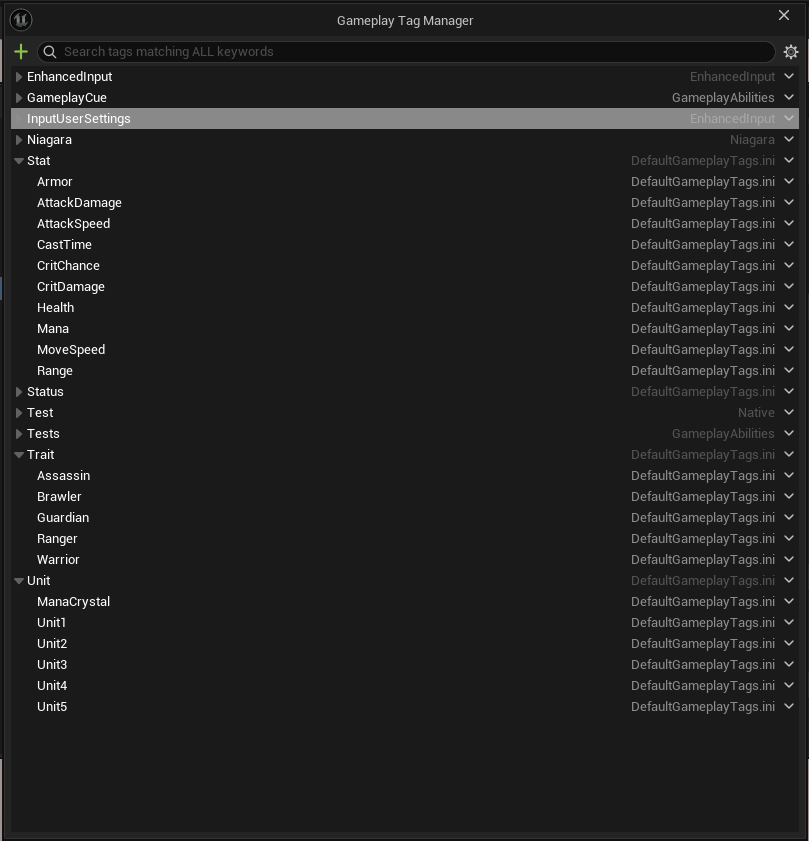
HitzMergeTactics.uproject → Generate Visual Studio project files.HitzMergeTacticsEditor target (Development Editor), or just double-click the .uproject — the editor will offer to build it for you on first launch.Source/HMT_Core and Source/HMT_CoreEditor (plus the optional bridge in Source/HMT_GASBridge) — copy those three folders into your own project's Source/, add matching entries to your .uproject's Modules array, and everything else in this guide still applies. Source/HitzMergeTactics is the sample-layer GameMode/PlayerState/UI wiring shown in this guide, not part of the reusable core.Stats, traits, and status effects are all identified by Gameplay Tags — you declare them once per project.
Add your tags in Project Settings → Gameplay Tags, or paste into Config/DefaultGameplayTags.ini. The reference set used by the sample content:
[/Script/GameplayTags.GameplayTagsSettings]
+GameplayTagList=(Tag="Stat.Health")
+GameplayTagList=(Tag="Stat.AttackDamage")
+GameplayTagList=(Tag="Stat.Armor")
+GameplayTagList=(Tag="Stat.Range")
+GameplayTagList=(Tag="Stat.MoveSpeed")
+GameplayTagList=(Tag="Stat.AttackSpeed")
+GameplayTagList=(Tag="Stat.CritChance")     ; optional — unset = no crits
+GameplayTagList=(Tag="Stat.CritDamage")     ; optional
+GameplayTagList=(Tag="Stat.CastTime")       ; optional — unset = instant casts
+GameplayTagList=(Tag="Status.Stun")         ; optional CC tags
+GameplayTagList=(Tag="Status.Root")
+GameplayTagList=(Tag="Status.Silence")
+GameplayTagList=(Tag="Status.Taunt")
+GameplayTagList=(Tag="Trait.Warrior")       ; one per trait you author
+GameplayTagList=(Tag="Trait.Ranger")
Tag names are entirely yours — the framework never hardcodes them. You tell it which tag means "health" in the next step.
All game content is authored as Data Assets — right-click in the Content Browser → Miscellaneous → Data Asset, then pick the class.
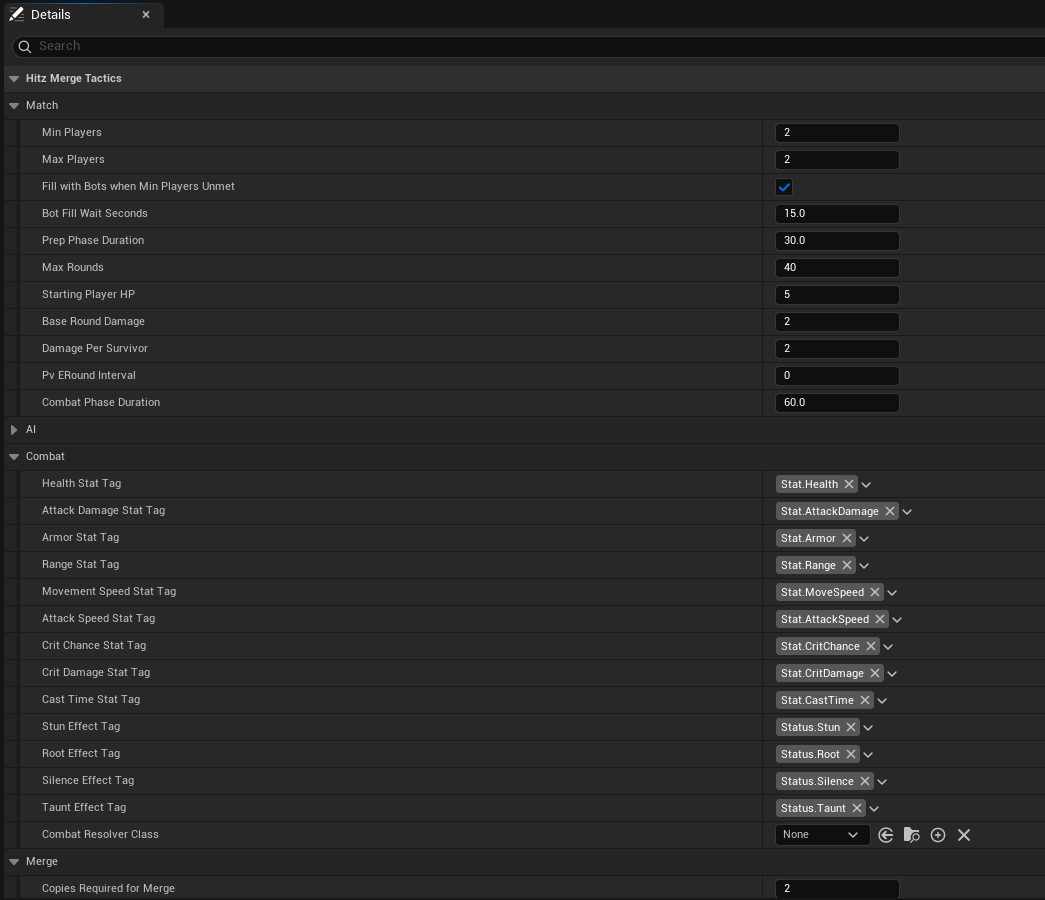
UHMT_MatchRulesAssetThe single source of truth for economy and match configuration. The important fields:
| Field | What it does |
|---|---|
MinPlayers | Players needed to start. For solo testing, prefer bFillWithBotsWhenMinPlayersUnmet over setting this to 1 — bots fill the lobby after BotFillWaitSeconds, so pairing/spectating still behave like a real match. |
StartingGold | Gold each player begins with. Must be > 0 or nobody can buy anything. |
ShopTierOdds | Flat per-tier roll weights (no player level/XP — odds are the same all match). Needs at least one non-zero entry. |
PoolSizeByTier / GoldCostByTier | Shared pool copies and prices per cost tier (1–5). |
AvailableGameModifiers / ModifiersPerMatch | Match-wide modifiers rolled at match start — see Ruler & Modifiers. |
| Stat tags (Health, AttackDamage, Armor, Range, MoveSpeed, AttackSpeed) | Maps your project's tags onto the combat resolver. All six must be set for combat to work. |
| Crit / CastTime / CC tags | Optional. Leave unset to disable that mechanic entirely — no other config needed. |
CopiesRequiredForMerge / MaxStarLevel | Merge rules — e.g. 3 copies to merge, 3-star cap. Merges run immediately on every buy, including a bench buy mid-combat. |
UHMT_BoardLayoutAssetTileMesh empty for a clean built-in procedural board. Hover / valid-drop / invalid-drop / selected states each take an optional material override.UHMT_UnitDefinition (one per unit)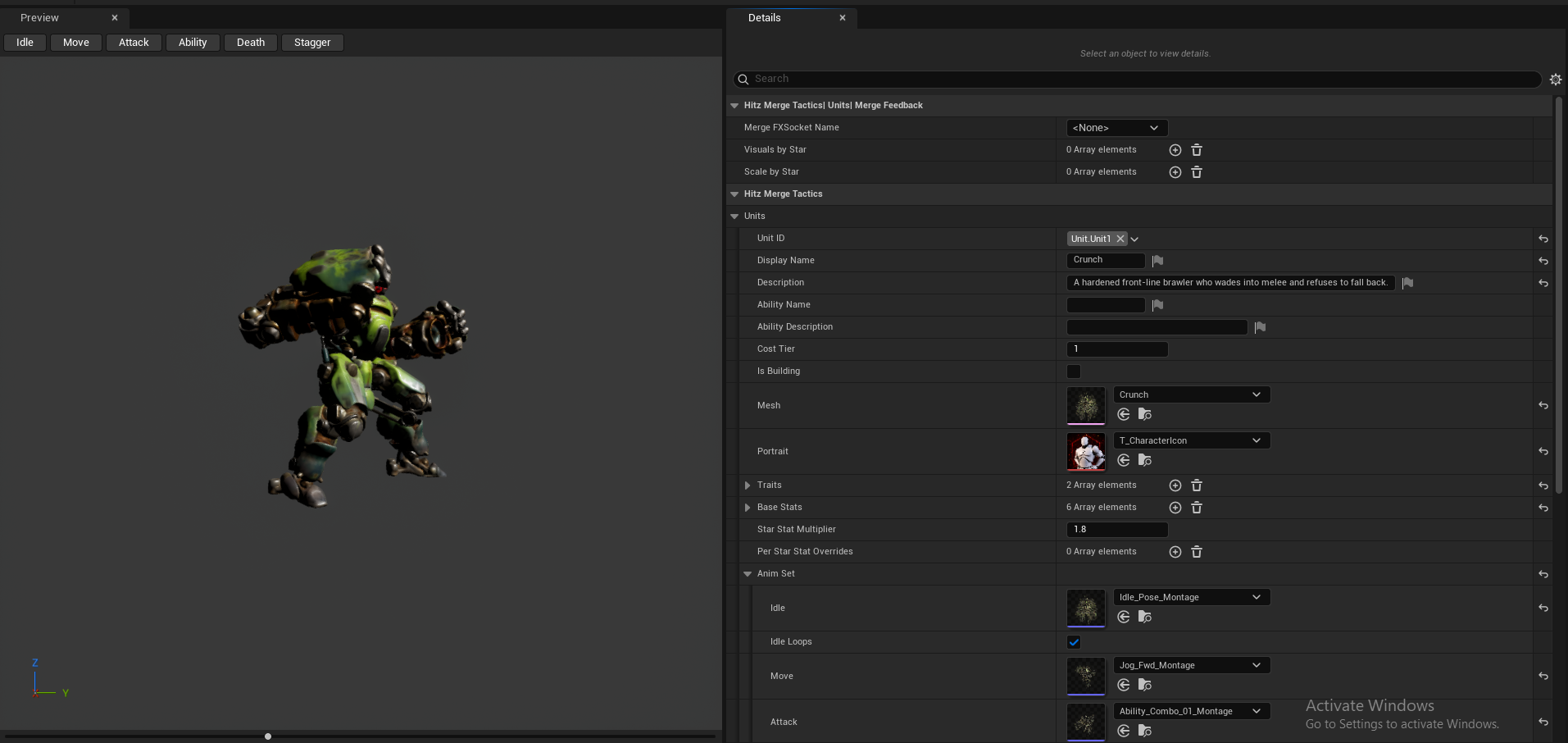
UHMT_TraitDefinition (one per trait)TraitEffectClass implementing IHMT_TraitEffect — Blueprint subclasses work.UHMT_PvERoundDefinition (optional)Both optional, both pure data + Blueprint — no C++ required for either.
UHMT_RulerDefinition per Ruler: name, icon, description, optional StartingHPOverride (0 = use Match Rules' default), optional RulerPassiveClass (implements IHMT_RulerPassive — OnMatchStart/OnRoundStart/OnCombatEvent hooks, e.g. a flat team-wide stat bonus or a gold-income modifier), and presentation (Mesh/AnimSet — the same struct units use, including Idle/Victory/Death poses).AvailableRulers array — one is randomly assigned per player (bots included) at match start.AvailableRulers empty for HP-only identity with no visible avatar. To get a Ruler actor standing beside each player's board with a floating overhead name/HP bar, use the reference project's RulerActorClass — it hides a Ruler on every machine except its owner's, and shows the spectated player's Ruler as a local-only projected ghost instead, the same way spectating projects their army.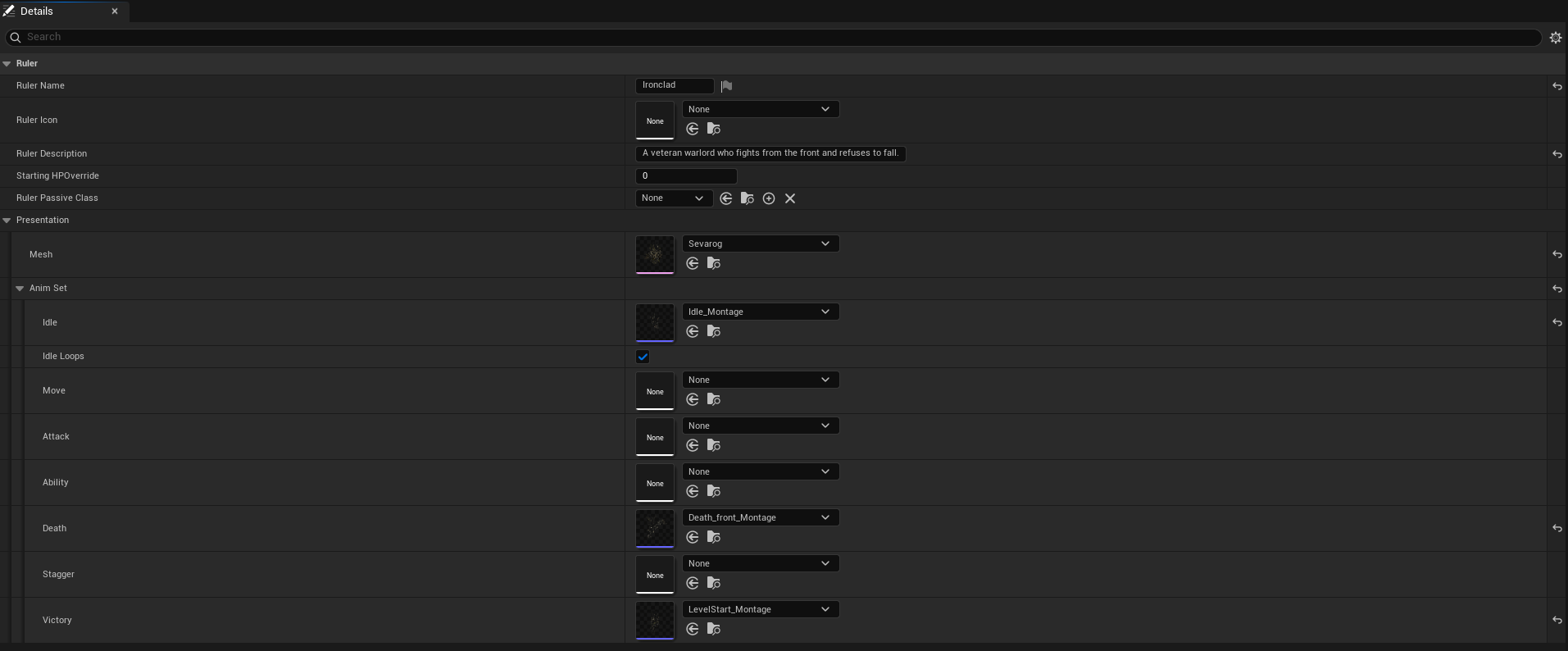
UHMT_GameModifierDefinition assets roll at match start from Match Rules' AvailableGameModifiers/ModifiersPerMatch and apply for the whole match via a Blueprint class implementing IHMT_ModifierEffect — e.g. the reference project's board-capacity-per-round and passive-mana-building modifiers.UHMT_TileModifierDefinition is the same idea scoped to a single board cell instead of match-wide, via IHMT_TileEffect.The framework is component-based — your GameMode, GameState, and PlayerState own the components. The reference project shows the complete wiring.
UHMT_MatchStateComponent and UHMT_ShopPoolComponent.UHMT_BoardComponent, UHMT_BenchComponent, UHMT_UnitCollectionComponent, UHMT_ShopComponent, UHMT_SynergyManagerComponent, and UHMT_CombatPlaybackComponent.StartMatch on the match state component — the reference GameMode does exactly this and is meant to be copied.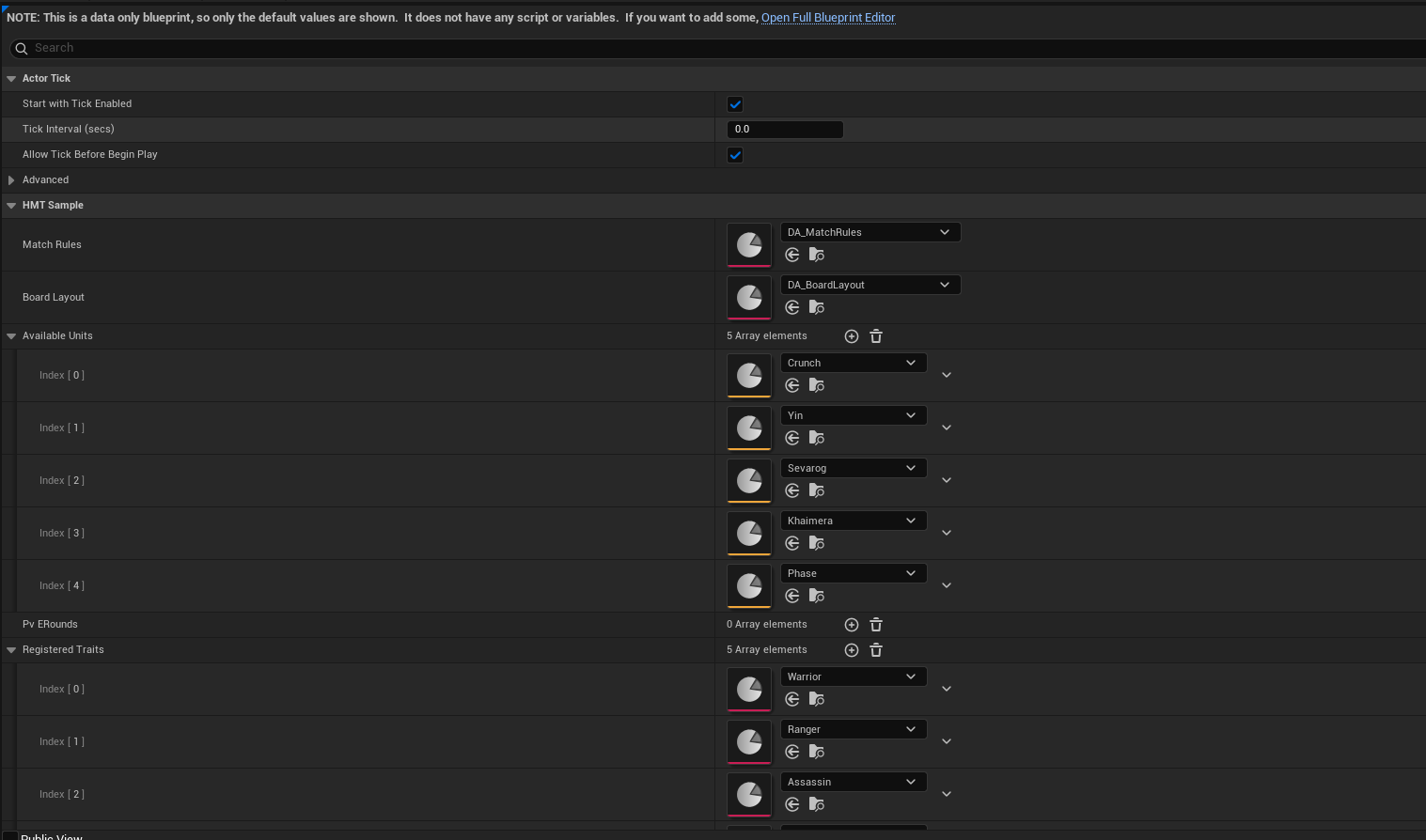
ConstructorHelpers::FObjectFinder instead — a C++ default can still be overridden per-Blueprint, it just can't be silently wiped.A complete reference HUD ships in Content/UI — pure UMG Blueprints, no C++ widget classes.
OwningRulerActor reference); the unit health bar is the one exception, pushed instantly on hit via IHMT_UnitHealthBarInterface.OnCombatEventReceived) — the same hook you'd use for hit VFX, damage numbers, or camera shakes.bFillWithBotsWhenMinPlayersUnmet on your Match Rules rather than setting MinPlayers = 1 — bots fill the lobby after a short wait, so pairing/spectating still exercise the real code paths instead of a degenerate 1-player case.Reference debug controls (from the sample player controller): number keys buy shop slots, R rerolls, C locks the shop, X sells the hovered unit, Tab spectates other boards, Enter force-ends preparation.
Everything replicates through standard UE actor replication — no custom netcode to configure.
MinPlayers join.Four small interfaces cover the customization points — all implementable in Blueprint.
| Interface | Extend it to… |
|---|---|
IHMT_TargetingStrategy | Change who a unit attacks — e.g. "lowest current HP" or "farthest enemy". Set per unit definition. |
IHMT_AbilityExecutor | Author active abilities. A combat context API provides AoE queries, damage/heal, forced movement, status effects, and summons. |
IHMT_TraitEffect | Traits that do things stats can't — react to combat events, heal allies, apply CC. |
IHMT_StatProvider | Swap the whole stat backend (this is what the bundled GAS bridge does). Most projects never touch it. |
Bigger levers: the damage formula is a BlueprintNativeEvent on the combat resolver (subclass + override, then point Match Rules at your resolver class), and merge thresholds accept a per-unit override.
For projects already built on GameplayAbilities. The bridge module (Source/HMT_GASBridge) is bundled and compiled in by default — you only need to opt into using it per unit.
UHMT_AttributeTagMapAsset mapping your stat tags to your existing AttributeSet properties — the bridge never ships its own AttributeSet.UHMT_ASCStatComponent in place of the default stat component on your units. Every other system is unchanged — they only ever talk to the interface.UHMT_StatComponent and never touch this — the bridge module simply sits unused. Pulling it out of your own project entirely means deleting Source/HMT_GASBridge and its GameplayAbilities/GameplayTasks dependency lines from the other modules' Build.cs files.The framework logs a named reason for every silent-looking failure — check the Output Log first. Common ones:
| Symptom | Cause & fix |
|---|---|
| Nothing spawns on Play | Match hasn't started — fewer than MinPlayers joined. Use 2-player PIE, or enable bFillWithBotsWhenMinPlayersUnmet and wait for the bot-fill timer. |
| Shop is empty / buying fails | Check GameMode's unit list is populated, each unit has a valid CostTier, and Match Rules has ShopTierOdds, PoolSizeByTier, and StartingGold > 0. |
| Combat ends instantly in a draw | The six required stat tags aren't set on Match Rules (units spawn at 0 HP). The log names exactly which tags are missing. |
| No traits ever activate | GameMode's RegisteredTraits is empty — this is the step buyers most often miss. |
| Units are invisible but work | No Mesh assigned on the unit definition — assign a skeletal mesh. |
| Units slide instead of animating | AnimSet montages unset — the content validator flags this on save. |
| Crits / cast bars / CC never happen | Those tags are optional and unset — set them on Match Rules to enable each mechanic. |
| A Ruler exists but has no world presence / health bar | AvailableRulers is empty (no Ruler assigned), or RulerActorClass/OverheadWidgetClass is unset — both optional, see Ruler & Modifiers. |
| Match config "was set" but the log still says it's missing | A Blueprint GameMode's own Class-Default override was lost across a rebuild — see the durability tip under GameMode Wiring. |
The included content validator also runs automatically on save and flags broken or incomplete data assets before you ever press Play.
HITZ: Merge Tactics ships as a complete, playable Unreal Engine project — grab it from the Fab marketplace, open it, and start building.
View on Fab